Showing posts with label cisco. Show all posts

Sunday, October 30, 2011

iLearn Part 7

After a week off from work I picked up the studies where I left them and have been looking at a few things, but notably getting hands on with a Cisco switch. I started by looking at what the IOS is, how it sets Cisco apart from other vendors and what different modes there are within this that determine what you can and cannot do.

There are three layers, each of which allows you to input certain commands. There's User Mode (also known as User Exec) from where you can only do a number of very limited show commands. Next up is Privileged Mode (Privileged Exec) that takes you into a mode that will allow you to do pretty much any show command you like, although won't allow you to change anything on the device. From this mode you can get to Global Configuration Mode, which does what it says on the tin, as in it allows you to change any configuration on the Switch, affecting it globally. In addition, from this mode you can then move to literally hundreds of other modes, but they are to carry out more specific config.

As well as looking at the command line modes I also spent some time on the boot process of a Switch, their physical indicators and a little initial config, which covered:

  1. Assigning a Hostname to the Switch;
  2. Giving the Switch an IP Address & Subnet Mask (Interface vlan 1) that allows connections to the switch remotely through a Telnet session;
  3. Turning that virtual interface that had just been configured on using the no shutdown command
  4. Giving the Switch a Default Gateway so if it's destination is not on it's local network, it can get off of that network via it's nearest Router (Default Gateway) to reach it's desired destination;
  5. Viewing the running config of the Switch to see what changes we had made and then saved them to the Non Volatile Ram of the Switch, so if the device were to reboot or crash the config applied would still be there.

I ended by checking out the Show command Show Version to get info on the hardware, IOS version etc. Let the config continue :)

Ish

Sunday, October 16, 2011

iLearn Part 6

It's been a busy weekend so I've only just managed to sit down and pick up where I left off last week, so let's go for it.

This time around I've been looking at Ethernet topics, notably CSMA/CD, which is a set of rules about how a device will talk on a network and what to do if more than one device tries to talk on the network at the same time. I also picked up on MAC addresses and the way they are given their address, i.e. 01de:ff43:22aa and how this is formed.

I then delved into the physical connections that allow you to connect to the world, so the likes of your Network Interface Cards in your PC, the cabling that can be used and the different ways to create and crimp that cable to fit your desired distances and needs.

The last topic I looked at really followed on from the above, as it was to do with Straight Through cables (for network devices which are meant to be connected together) and Crossover cables (for devices that typically don't connect together).

The cabling topics were really interesting and it gets you thinking about the amount of cable we all waste and have coiled up in the corners of our room or behind our desks. I may even pick up a spool of my own now and crimp it myself :)

Ish

Monday, October 10, 2011

iLearn Part 5

Continuing on like a trooper I covered two topics before finishing up tonight. These were Port numbers and the Well Known Port Numbers, then a little more of TCP/IP with how two packets of data traverse a local network and the wider WAN network.

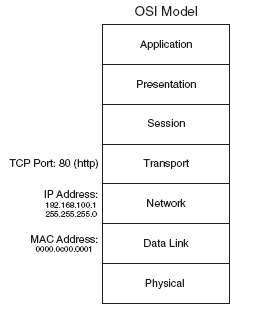
Port numbers are used to distinguish what server/application a host is trying to access, so for example if you open a web browser window and head over to Google, then your PC will have to get that web page from the google server/s. To do this your PC traverses the network (if that server is not on the local network) on it's way to the google web servers, all the time using a target port of 80, which is the well known port for http (the web) and allows the receiving server for example know what service you are trying to get too. Whilst this is the destination port there also needs to be a source port, which is a number that windows dynamically assigns to that specific Chrome, Firefox or IE tab.

I finished off running through some examples of two packets of data, one that only has to worry about finding it's destination on only the Local Area Network with an ARP! The other that has to leave it's LAN and travel the WAN, each time having an element of it's data packet stripped off to allow this to occur until it gets to it's final destination.

The amazing thing is that this happens in a matter of seconds, and not minutes or hours! Great stuff.

Ish

Saturday, October 08, 2011

iLearn Part 4

So it's onward and upward from the OSI &TCP/IP battle we go!

My next stop has seen me take in the TCP three way hand-shake, and no this isn't some sort of US fraternity I'm joining it's a crucial part of the reliable communication that TCP gives you. It's quite amazing how so many people use computers on a daily basis, yet don't know what's going on behind the scenes to send that e-mail, or load up that website (although to be fair, neither did I until recently :p).

Along with the 3-way I've also been looking at Sequence numbers that are attached to data packets during that reliable conversation and TCP windowing.

Ever wondered why when you copy that file from one device or location to another on your PC the resulting dialog box temporarily doesn't seem to know how long it's going to take? Well that's Windowing, it is the reliable communication method TCP trying to determine how much data it can send at once before it overwhelms it's destination. Interesting stuff :)

My next stop is going to be looking at Port numbers, well known and otherwise and also some basic TCP/IP. Great stuff :)

Ish

Thursday, October 06, 2011

iLearn Part 3

So, what have I learnt today I hear you shout, well I can tell you that it's definitely starting to heat up in the complexity stakes!

I started of comparing the OSI and TCP/IP standard, and how they relate to one another's respective layers and the fact that they are a suite of protocols not just a single one. This included the Application, Presentation and Session layers of the OSI model becoming just the Application layer in the TCP/IP model.

I then moved on to the IP address format, with it's 4 octets, each having the ability to range from 0 - 255 and that an IP address will come combined with a subnet mask, and typically a default gateway dragging it's heals also. That way if it's not local communication we're talking about the data can get to it's destination successfully :)

Adding to that I spent some time on the two address concept, which is the Network layers IP address and the Data Links Ethernet Mac Address (00ac:45ee:22ff) which is burnt in to each network card during the manufacturing stage.

From there led me on to some examples of local communications (on the LAN) and the dog barking .... sorry ARP'ing. (see Jeremy Ciora @ cbtnuggets for an explanation on that lol). Then communications off of the local networks, which means leaving the safety of the network you know and venturing out via the default gateway onto the scary wide area network, eeeek!

And finally to wrap up I covered the different classes of IP address. These being class A (1-126 in the first octet), B (128-191 in the first octet) & C (192-223 in the first octet), which you can identify from just looking at an IP address.

I did also touch upon both Private and Public IP addresses and how Network Address Translation (NAT) can be used, but that's for another time :)

Ish

Wednesday, October 05, 2011

iLearn Part 2

How! - So my second lesson involved looking at the Open Systems Interconnection (OSI) Model and how we can relate this to a real life example.

It was a dual several decades ago that took play that saw OSI take on TCP/IP in a dual for supremacy. Well TCP/IP won, as that's what the majority of PCs you and I use today, however OSI was a better model as it makes troubleshooting network issues much easier. Using the OSI model you can break down the problem into chunks, thus allowing you to locate where an issue is and find a fix for it.

I've read the section about the OSI model in the official exam certification book, but must admit I much prefer the cbt nuggets video by Jeremy Ciora. He breaks down and talks you through each layer and then provides you with a real life example so you can see each layer in action (which are present in TCP/IP, but with different names and some are grouped together) and how the simple action of opening up a website in a browser actually does that - it's some cool stuff!
So the main points I covered were:
  1. The 7 Layers of the OSI model
  2. How to remember them - Please Do Not Throw Sausage Pizza's Away (Layer 1 - 7 bottom to top)
  3. Relating the OSI model to a real work example
I'm looking forward to delving further into the OSI model and how OSI and TCP/IP relate in the coming days/weeks.

Ish

Tuesday, October 04, 2011

iLearn Part 1


So I thought I'd keep a record of what I've been learning over the past day, to both put it down on paper but also keep a record. I can then refer back to these posts if necessary to jog my memory on what I've recently taught myself.
What I'm using to assist in my learning consists of the following:
With all of these tools I'm hopeful that the information should stick and when the exams come around I should be ready.
Anyhow, to rejig my aging memory I started by going over the following yesterday:
  1. Fundamentals of a Network, the common devices (PCs, Servers, Switches, Routers) and where they fit on the network;
  2. Network Topologies, so your Bus, Ring and Star;
  3. Networks designs and how the topologies come together to form some of these;
It was an easy reintroduction and I'm looking forward to the next bit. Oh and I can't reccomment the Jeremy Ciora cbt nuggets videos enough, he adds a bit of fun and comedy into the clips, which help a huge amount.

Ish

Thursday, September 22, 2011

Focus, Where Did It Go!

Why do people find it difficult to focus on things they really want to do and achieve?

Let's take my current goal at the moment, to pass my CCNA Cisco exam. Now I've been studying on and off for about 1.5 years and taken and failed the exam, do I have the fear, has failing demotivated me in some psychological way or am I just lazy and need to focus more....

I've asked myself this question quite a few times and I always seem to come up with the same answer, which is that it's none of these, but that I spend too much of my free time either playing Warhammer Online: Age of Reckoning and Lord of the Rings Online, watching too much TV or just not doing what I should be doing if I want to get to where I want to be (man that was a mouthful!).

To add insult to injury I work in Network Support, so I have the ideal platform to exploit and to assist me in my learning process and subsequent exam success, however there is something missing.

That being the case I've decided to cancel my WAR sub, well rather not renew it and try and refocus on what is more important to me (therefore certification comes second to the GF :)). I will however still pitch in and play LotRO as that's easier to pick up and put down and doesn't cost me a penny.

Watch this space. /huddle ..... /cheer "gooooooo me!"

Ish